Google Chrome’s hidden Gemini Nano model downloader (activated by default) downloads around 4 GiB of data to the file weights.bin at every update to run locally Gemini Nano. To avoid such behaviour, the following workaround steps should be taken:
Windows
Open the Chrome’s settings page chrome://flags/.
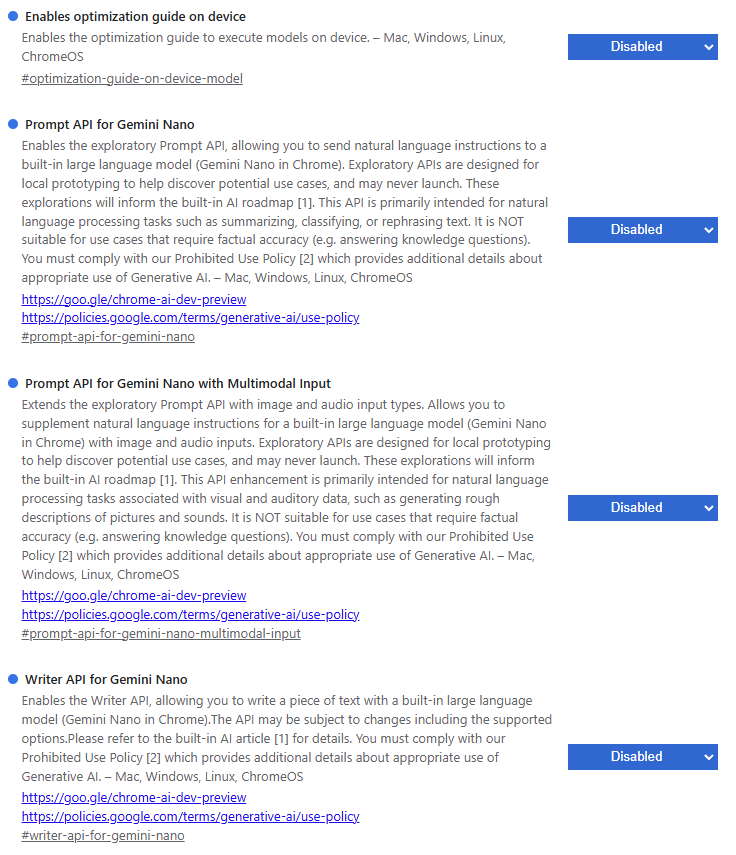
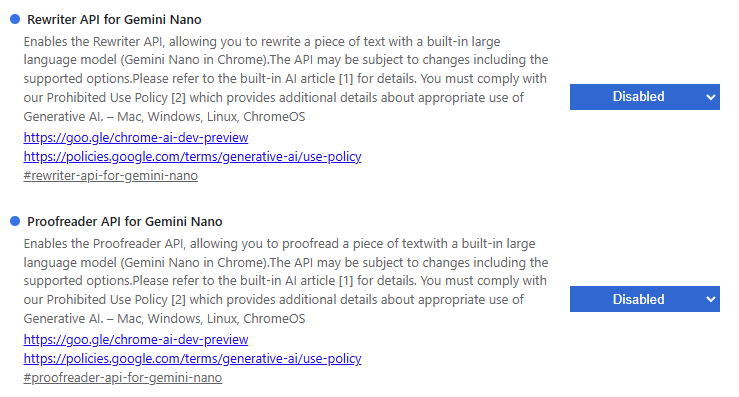
Here the local AI settings should be localised and switched to Disabled:
- Enable optimization guide on device
- Prompt API for Gemini Nano
- Prompt API for Gemini Nano for Multimodal Input
- Writer API for Gemini Nano
- Rewriter API for Gemini Nano
- Proofreader API for Gemini Nano
Now the model files themselves should be deleted:
del '~\AppData\Local\Google\Chrome\User Data\OptGuideOnDeviceModel\*'
To prevent the new download of the weights.bin file, the stub should be created as a read-only object:
New-Item -Path '~\AppData\Local\Google\Chrome\User Data\OptGuideOnDeviceModel\weights.bin'
Set-ItemProperty '~\AppData\Local\Google\Chrome\User Data\OptGuideOnDeviceModel\weights.bin' -name IsReadOnly -value $true
MacOS
On MacOS the procedure is exactly the same with Chrome, but the file weights.bin is located in the following directory:
~/Library/Application Support/Google/Chrome/OnDeviceHeadSuggestModel
Linux
On Linux, the file weights.bin should be located using the following command:
find ~ -name weights.bin -type f
Usually, it is the Chrome userspace config directory ~/.config/google-chrome.